Lightbox Gallery plugin
22 4月
WordPress 2.5の新機能 ギャラリーを使って画像一覧表示するという記事でWordPress 2.5からの新機能であるの使い方を説明したが、このgalleryを使ってフォトログや写真アルバムサイトを構築するにはいまいち役不足だったので、を拡張してプラグイン化してみた。その名も、Lightbox Galleryというプラグインである。

Lightbox Gallery [ English here ]
必須条件
WordPress 2.5以上
特徴
Lightbox Galleryは、の機能を拡張し、Lightboxで画像・写真を表示できるように変更するプラグインである。Lightbox Galleryの主な特徴は以下のとおり。
- Lightboxで画像・写真を表示
- Tooltip(ツールチップ)で画像のキャプションを表示
- 写真の一覧表示はローディングっぽく遅延表示
- 写真の付随情報(機種・絞り値など)を表示
- ギャラリーの分割表示
ヒストリー
- 2009.12.21 Lightbox Gallery 0.6.2 公開
- スクリプトをすべてのページで読み込むオプションの追加。
- 2009.11.09 Lightbox Gallery 0.6.1 公開
- バグフィックス:JavaScriptエラー。
- 2009.11.08 Lightbox Gallery 0.6 公開
- にclass属性を設定すると、ギャラリーが分割表示されます。
- Highslide JSのサポート
- JavaScriptのフッターロード
- 2009.09.10 Lightbox Gallery 0.5 公開
- jquery.lightbox.cssとjquery.tooltip.cssをlightbox-gallery.cssに統合
- ベラルーシ語、ブラジルポルトガル語
- 2009.07.28 Lightbox Gallery 0.4.7 公開
- デフォルトのサムネイルサイズ、lightboxサイズの追加
- 2009.07.23 Lightbox Gallery 0.4.6 公開
- スペイン語、ポーランド語
- バグフィックス:翻訳不完全部分
- 2009.07.02 Lightbox Gallery 0.4.5 公開
- オランダ語
- 2009.06.03 Lightbox Gallery 0.4.4 公開
- フランス語
- 2009.05.25 Lightbox Gallery 0.4.3 公開
- ロシア語
- バグフィックス:JavaScript
- 2009.05.15 Lightbox Gallery 0.4.2 公開
- ページナビゲーションのバグ修正
- 2009.05.14 Lightbox Gallery 0.4.1 公開
- lightbox-gallery.jsをテーマディレクトリから読み込めるように。
- イタリア語
- 2009.04.27 Lightbox Gallery 0.4 公開
- from, num属性の追加。ギャラリーの分割。
- 管理画面で各種オプション設定。
- 2008.09.30 Lightbox Gallery 0.3.1 公開
- バグフィックス。
- 2008.09.30 Lightbox Gallery 0.3 公開
画像をゆっくり表示させている方は更新時にlightbox-gallery.jsの7行、8行目のコメント化を解除してください。- 1ページに表示する画像枚数が多くなった場合にLightboxが表示されない不具合を修正。特にSafari。
- js、cssをギャラリーがあるページのみ読み込み。
- 2008.09.05 Lightbox Gallery 0.2.6 公開
- バグフィックス。
- 2008.08.24 Lightbox Gallery 0.2.5 公開
- バグフィックス。
- 2008.08.21 Lightbox Gallery 0.2.4 公開
- rel="nofollow"に対応。画像の説明にリンクタグがあった場合のバグ修正。lightbox-gallery.cssのテーマ場所への設置対応。
- 2008.07.16 Lightbox Gallery 0.2.3 公開
- WordPress 2.5と2.6でorderbyの指定方法が異なる点を修正。
- 2008.07.15 Lightbox Gallery 0.2.2 公開
- WordPress 2.6のソースベースに変更。ISOを追加。
- 2008.05.08 Lightbox Gallery 0.2.1 公開
- のclass属性の追加。
- 2008.05.08 Lightbox Gallery 0.2 公開
- ショートコードのを使わずにlightboxで画像を表示する(rel="lightbox")のサポート
- 2008.04.22 Lightbox Gallery 0.1 公開
ダウンロード
Lightbox Galleryプラグインのダウンロードは下記のリンクをクリックしてください。
または
インストール
- Lightbox Galleryプラグインをインストールするには、上記の圧縮ファイルを解凍し、lightbox-gallery.jsの2行目のパスをご利用の環境に合わせて設定する。
- lightbox-galleryディレクトリをそのままwp-content/pluginsディレクトリにアップロードし、Lightbox Galleryを有効化する。
テーマファイルの場所にlightbox-gallery.cssやlightbox-gallery.jsがある場合はそちらを読み込みます。ない場合はLightbox Gallery pluginにあるlightbox-gallery.cssとlightbox-gallery.jsを読みます。cssやJavaScriptを変更する場合は、テーマファイルの場所にlightbox-gallery.cssとlightbox-gallery.jsを置いておくと、プラグインのアップグレード時に上書きせずに済みます。
寄付
プラグインがお気に召しましたら、よろしければ下記のPaypalリンクよりご寄付ください。よろしくお願いいたします。
使用方法
Lightbox Galleryを使用方法は、WordPress 2.5以降に搭載されているギャラリーと基本的には同じである。写真を複数登録し、タグを投稿欄に挿入するだけである。写真のキャプションは、マウスが画像の上にくるとtooltip(ツールチップ)として表示され、写真の説明はLightboxが表示される際に表示される。
上級設定
のショートコードのオプションは全て使用できる。詳しいオプションについては、WordPress 2.5の新機能 ギャラリーを使って画像一覧表示するを参照してほしい。ここでは、標準のオプションに加えて、Lightbox Galleryで付け加えたオプションを説明する。
- lightboxsize
lightboxsizeに指定した大きさでLightboxを表示する。デフォルトではmedium になっているが、full に指定することも可能。CODE:-
[gallery lightboxsize="full"]
-
- meta
metaは写真の付随情報を表示するかどうかを指定する。デフォルトではfalseになっており、表示されない。表示したい場合はtrueを指定する。写真の付随情報は、カメラの機種、絞り値、焦点距離、ISO、シャッタースピード、撮影日時をLightboxに表示する。CODE:-
[gallery meta="true"]
-
- class
classはgalleryのクラス属性を追加する。デフォルトではgallery1になっている。CODE:-
[gallery class="gallery2"]
-
- nofollow
rel="nofollow"を追加する。デフォルトではfalseになっている。CODE:-
[gallery nofollow="true"]
-
- from, num
fromは表示する画像位置、numは表示したい画像数。以下は3枚目の画像から5枚画像を表示する例。CODE:-
[gallery from="2" num="5"]
-
- pagenavi
numを使用時に画像数に応じて画像のナビゲーションリンクが表示される。pagenaviを0にセットすると、ナビゲーションリンクを表示させない。ナビゲーションについては、wp_link_pagesと同じオプションが使用できる。CODE:-
[gallery num="10" pagenavi="0"]
-
[実例] Lightbox Galleryプラグインを使用した写真アルバム(フォトログ)サイト
このLightbox Galleryプラグインを使用し、テーマもカスタマイズしたサイトを作成した。記憶の記録@GENTOKIというサイトで、筆者が実際に撮った写真を掲載している写真アルバム(フォトログ)サイトである。
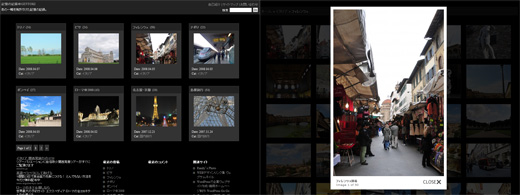
もし需要があるようならテーマファイルも公開したいと思う。要望はコメント欄やお問い合わせから。その他、不具合やご質問・感想等があれば何なりとおっしゃってほしい。
Lightbox Gallery
This plugin changes the view of galleries to the lightbox.
Requirement
WordPress 2.5
Features
- Lightbox display of Gallery
- Tooltip view of caption of images
- Displays the associated metadata with images
Download
OR
Install
- Edit the `lightbox-gallery.js` and check the path of line 2 according to your settings.
- Copy the `lightbox-gallery` directory into your `wp-content/plugins` directory
- Activate the plugin through the 'Plugins' menu in WordPress
- That's it! :)
Lightbox Gallery will load 'lightbox-gallery.css' and 'lightbox-gallery.js' from your theme's directory if they exist.
If they don't exist, they will just load the default 'lightbox-gallery.css' and 'lightbox-gallery.js' that come with Lightbox Gallery. This will allow you to upgrade Lightbox Gallery without worrying about overwriting your lightbox gallery styles that you have created.
Donation
If you liked this plugin, please make a donation via paypal! Any amount is welcome. Your support is much appreciated.
History
- 2009.12.21 Lightbox Gallery 0.6.2 Release
- Enforced loading option of lightbox gallery scripts.
- 2009.11.09 Lightbox Gallery 0.6.1 Release
- Bugfix: JavaScript error.
- 2009.11.08 Lightbox Gallery 0.6 Release
- If you set the `class` attribute into , galleries are handled separately. ex)
- Support for the Highslide JS.
- Support for the javascript loading in the footer.
- Turkish (tr_TR) - Hakan Demiray
- 2009.09.10 Lightbox Gallery 0.5 Release
- Combine jquery.lightbox.css and jquery.tooltip.css into lightbox-gallery.css.
- Brazilian Portuguese (pt_BR), Belorussian (be_BY)
- 2009.07.28 Lightbox Gallery 0.4.7 Release
- Default thumbnail size and lightbox size.
- 2009.07.23 Lightbox Gallery 0.4.6 Release
- Spanish, Polish
- Bugfix: translation miss
- 2009.07.02 Lightbox Gallery 0.4.5 Release
- Dutch
- 2009.06.03 Lightbox Gallery 0.4.4 Release
- French
- 2009.05.25 Lightbox Gallery 0.4.3 Release
- Russian
- Bugfix: JavaScript
- 2009.05.15 Lightbox Gallery 0.4.2 Release
- Bugfix: page navigation
- 2009.05.14 Lightbox Gallery 0.4.1 Release
- Loads `lightbox-gallery.js` from your theme directory. Do not worry about overwriting in upgrade of the plugin any more.
- Italian
- 2009.04.27 Lightbox Gallery 0.4 Release
- Adds from and num attributes. Gallery Division.
- Additional settings are set in the option page
- 2008.09.30 Lightbox Gallery 0.3.1 Release
- Bugfix
- 2008.09.30 Lightbox Gallery 0.3 Release
If you make images display slowly, please edit lightbox-gallery.js line 7 and 8.- Bugfix that lightbox does not work when images increase, especially Safari.
- Output jquery and lightbox scripts only in the replated page.
- 2008.09.05 Lightbox Gallery 0.2.6 Release
- Bugfix
- 2008.08.24 Lightbox Gallery 0.2.5 Release
- Bugfix
- 2008.08.21 Lightbox Gallery 0.2.4 Release
- Adds the nofollow attribute. A bugfix for the situation which includes link tags in the description field. Load 'lightbox-gallery.css' from your theme's directory if it exists.
- 2008.07.16 Lightbox Gallery 0.2.3 Release
- Fixes the orderby difference between WordPress 2.5 and 2.6.
- 2008.07.15 Lightbox Gallery 0.2.2 Release
- Changes to the source based on WordPress 2.6. Adds the ISO attribute.
- 2008.05.08 Lightbox Gallery 0.2.1 Release
- Adds a class attribute into .
- 2008.05.08 Lightbox Gallery 0.2 Release
- Supports rel="lightbox" to make regular images appear in a lightbox.
- 2008.04.22 Lightbox Gallery 0.1 Release
How to use
How to use this plugin is basically the same as the way to add which has been adopted by over WordPress 2.5. Lightbox Gallery plugin automatically converted the default view of gallery into the lightbox view. Photo captions are displayed as tooltips. Photo descriptions are displayed when the lightbox pops up.
Frequently Asked Questions
How can I make regular images appear in a lightbox without shortcode?
Just add rel="lightbox" into "a" tag. Here is a sample.
<a href="image.jpg" rel="lightbox" title="this is a caption">
<img src="thumbnail.jpg" alt="" />
</a>
How can I handle multiple galleries in one page as saparate ones?
You need to do two steps. If you would like to handle galleries separately, add different class names into and add codes as many as class names into `lightbox-gallery.js`.
- Edit `lightbox-gallery.js` and add some codes. Look at the comment of the file.
- Add a class attribute into . ex)
Advanced settings
There are three additional options to extend the shorttag .
- lightboxsize
The image size when the lightbox pops up. The default is medium, but you can change to full.CODE:-
[gallery lightboxsize="full"]
-
- meta
Defines whether the exif information is displayed. The default is false. If you want to show the photo info, set true. The exif shown on the lightbox includes camera body, aperture, focal length, ISO, shutter speed, and created timestamp.CODE:-
[gallery meta="true"]
-
- class
Adds a class of the gallery. The default is 'gallery1'.CODE:-
[gallery class="gallery2"]
-
- nofollow
Adds the attribute, rel="nofollow". The default is false.CODE:-
[gallery nofollow="true"]
-
- from, num
Defines from which and how many photos are displayed. If the number of photos is over that of num, the navigation will be shown. You can use the navigation option almost same as the wp_link_pages function.CODE:-
[gallery from="2" num="5"]
-
- pagenavi
If you would like not to show the navigation, set 0. The default is 1.CODE:-
[gallery num="10" pagenavi="0"]
-
Demo
See Record of memory @ GENTOKI.
It's my photo album site.
Thanks.


![WordPress逆引きデザイン事典[2.X対応]](http://ecx.images-amazon.com/images/I/51wvZ9nbUSL._SL160_.jpg)


![コンテンツマネジメント パーフェクトガイド 基本・計画編 [DESIGN IT!BOOKS] (DESIGN IT!BOOKS)](http://ecx.images-amazon.com/images/I/41QpgDmTedL._SL160_.jpg)
![コンテンツマネジメント パーフェクトガイド デザイン・構築編 ~CMSによるコンテンツ管理の実践~ [DESIGN IT!BOOKS] (DESIGN IT!BOOKS)](http://ecx.images-amazon.com/images/I/41U7NAF%2BxjL._SL160_.jpg)


I’m not sure if I got that right: Should it make regular images appear in a lightbox instead of as a plain image in the same tab? if so, that’s exactly what I am looking for. But after installation, nothing happens with the images so far… :-(
Posted at 2008.05.01 5:05 pm by Birgit
Hi Birgit,
You have a good question. I did not come up with such a need, because I am using only [gallery] which is one of WP 2.5 new features for my photo album site.
Anyway this is a tip for what you want to do. Just enclose ‘a’ and ‘img’ tags by ‘gallery’ class. Here is a sample.
<div class=”gallery”>
<a href=”image.jpg” title=”this is a caption”>
<img src=”thumbnail.jpg” alt=”thumbnail” />
</a>
</div>
I hope it will work for you.
Posted at 2008.05.01 5:40 pm by Wordpress Go Go
Hello,
I tried using this plug-in, but it doesn’t work for me. Whenever you click on one of the images in the gallery, it just opens the image on a blank page, it doesn’t use the Lightbox Javascript at all. How can I fix this? You can view the problem at http://jake-moore.com/gallery/
Posted at 2008.05.05 12:27 pm by Jake Moore
Hi Jake,
I could not find any problem because you did not seem to activate the lightbox gallery plugin. Let me know again after you activate it. I may find out some clues to fix it.
Thanks.
Posted at 2008.05.05 2:46 pm by Wordpress Go Go
Sorry about that. It is activated now.
Posted at 2008.05.06 8:14 am by Jake Moore
Hello I have installed the plugin Lightbox Gallery in my site but I do not know that I must follow route to see the installed gallery. I hope that you may help me to utilize it efficaciously
bye
Posted at 2008.05.06 12:11 pm by Manuel Muñoz
Hi Jake,
I looked at your gallery page. Firefox says,
jQuery(“.gallery a”).lightBox is not a function
jQuery(‘.gallery a’).lightBox();
I am not sure what is the exact reason, but could you try after stopping the SimpleModal Contact Form (SMCF) plugin? This plugin calls own jQuery and it may happen the conflict error.
I found a forum post which seems to be related to this. Check it out.
http://wordpress.org/support/topic/173211
Thanks.
Posted at 2008.05.06 1:10 pm by Wordpress Go Go
Hi Manuel,
Could you show me your gallery page? I do not know what is the problem. I may give you some suggestion by seeing your site.
Thanks.
Posted at 2008.05.06 1:16 pm by Wordpress Go Go
Hey,
I tried that fix and it didn’t have any effect. I did disable SMCF and it solved the problem, but I would rather keep the SMCF.
Posted at 2008.05.07 2:48 am by Jake Moore
Hi Jake,
Did you see the link I posted above? It is worth to try adding ‘jQuery.noConflict();’ into smcf.js, which the guy on the forum says. I hope it will work for you.
Cheers!
Posted at 2008.05.07 3:01 am by Wordpress Go Go
Hi!
Great plugin!
But I have some requests for future versions. :)
- Could you also include lightbox for single images in posts? (Without the need of wrapping the image in an gallery class).
- I ran into a small feature/bug that triggers when a page has more than one gallery instances. For example: http://www.yukka.nl/cat/fotos/
Lightbox handles all different galleries as one big gallery. (As expected this also happens whit single images embedded in gallery classes)
Posted at 2008.05.08 6:09 am by Jeroen
First, let me say that this is an absolutely brilliant plugin! I was thinking of building something like this until I found your plugin, and I’m using it on my own web site now.
I have found a minor bug, however. When you have too many images on a page in Safari (any version, I’m using 3.1 Mac), you get a JavaScript error “Maximum call stack size exceeded.” A little research shows that this is because Safari has a 100 command call stack versus 1000 for FireFox, but it doesn’t look like Safari is going to change this any time soon. (The stack size has been this way since at least 2.0, and hasn’t been changed.) You can see this issue on my Portfolio page at http://www.stilldesigning.com/portfolio. Works great in FireFox and IE, but no lightbox in Safari. Sad. :(
- Dave
Posted at 2008.05.08 6:33 am by Dave Still
Hi Jeroen,
Thank you for using the lightbox gallery plugin. I released version 0.2.1 today. This supports rel=”lightbox” to make regular images appear in a lightbox. You do not need to use [gallery] shorttag and enclose ‘a’ and ‘img’ tags by ‘gallery’ class. Just add rel=”lightbox” into “a” tag which you want to show in a lightbox.
If you would like to handle galleries separately, add different class names into [gallery] and add codes as many as class names into `lightbox-gallery.js`. Something like this:
#post
[gallery class="gallery2"]
[gallery class="gallery3"]
#lightbox-gallery.js
jQuery(‘.gallery2 a’).lightBox({captionPosition:’gallery’});
jQuery(‘.gallery2 a’).Tooltip({track:true, delay:0, showURL: false});
jQuery(‘.gallery3 a’).lightBox({captionPosition:’gallery’});
jQuery(‘.gallery3 a’).Tooltip({track:true, delay:0, showURL: false});
I know this is not a smart solution, but it should work.
Thanks.
Posted at 2008.05.08 3:31 pm by Wordpress Go Go
Hi Dave,
I confirmed an error happens in using safari, as you says, when many images exist. I am not sure how I can fix it, but here is one option for you. There is an option that images load slowly in the lightbox gallery plugin. See lightbox-gallery.css and make a line which is the comment enable, then images start loading slowly. If you use this, Safari does not show an error. I am using this in my demo site. Check it out.
Cheers!
Posted at 2008.05.08 3:45 pm by Wordpress Go Go
I noticed the new release. Great, Thanks! :)
Posted at 2008.05.08 3:50 pm by Jeroen
Hi !!
I installed and activated the plugin but when I have galleries (i.e. the [gallery] command)in the post, I am not able to see anything, insetad if I use the otpion you indicated for a single image, it works!! What’s happnening?? Once I deactive your plugin the galleries are visible again…
Posted at 2008.05.18 2:51 am by Fonzj
Hi Fonzj,
I am not sure why the plugin does not work in your website. Do you have any errors in the gallery page when you activate the plugin? Did you check the source of the gallery page? Nothing outputed? Also check the other plugins and try turning off one by one in order.
Cheers.
Posted at 2008.05.18 9:42 pm by Wordpress Go Go
Luv the plugin, but cant figure out how to change the thumbnail size. Currently its creating thumbnails at 150×150 and I would like to make it much smaller. Please help! :) Thank you!
Posted at 2008.05.21 9:42 am by Raylay
Hi Raylay,
The thumbnail size is defined in the Miscellaneous Settings of admin menu. You can change both the thumbnail size and medium size of images.
Cheers.
Posted at 2008.05.21 9:53 am by Wordpress Go Go
Thanks for the quick response! I was afraid you may say that about the Misc. Settings because I have changed them and it still isnt working – have you heard of any bugs with this? Or do you know where in the Wordpress PHP files I may be overriding the thumbnail settings unknowingly? Thanks again and suggestions are soooo appreciated! :)
Posted at 2008.05.22 6:20 am by Raylay
Another thought – can you give me code that will override the Misc Settings thumbnail size that I can add to the lightbox-gallery.php file? Thanks again! :)
Posted at 2008.05.22 7:48 am by Raylay
After all the questions I found a solution by adjusting the CSS, thanks anyway! Great plugin! :)
Posted at 2008.05.22 8:22 am by Raylay
I think thumbnails which were created once does not resize automatically even if you change the thumbnail size at the Miscellaneous Settings. Anyway I am glad to hear you found a solution.
Posted at 2008.05.22 8:56 am by Wordpress Go Go
Me again! I do have a few more problems:
1. My tooltips are appearing to the far right of my thumbnails, several hundred picels off (using IE6)
2. The rel=”lightbox” isnt working for seperate images
3. Once I updated to your newest release, the captions now do not show in the expanded lightbox image.
Here’s a link to the post http://alysonstoner.com/?p=77&preview=true
Thanks for any help you can provide! :)
Posted at 2008.05.24 1:52 am by Raylay
I can not see the link you showed because it’s not published. Let me know again after making it publish. I have no idea what happened until seeing the page. Thanks.
Posted at 2008.05.24 1:03 pm by Wordpress Go Go
Hello
Great job you did. Is it possible to add the tite of the pictures ? I use the [gallery lightboxsize="full"] settings but title doesn’t appear in the box ?
Posted at 2008.05.25 5:13 pm by Jean-Marc
Hi Jean-Marc,
The captions of images are treated as the titles and tooltips. It does not matter whether you set the lightboxsize. You need to fill out the captions in each image. Let me know the page you publish and I may suggest something else. Cheers.
Posted at 2008.05.26 1:05 am by Wordpress Go Go
I am having issues getting the plug-in to work on my site. If you go here:
http://www.commitsnowandskate.ca/wp/2008/06/wakeboards-are-in/
I can’t seem to figure out why? It would be perfect if it could work. If you could take a look and let me know your thoughts. Thanks!
James
Posted at 2008.06.03 7:11 am by James Bull
Hi James,
Could you change the 2nd line of lightbox-gallery.js to the following:
var lightbox_path = “http://’+location.hostname+’/wp/wp-content/plugins/lightbox-gallery/”;
Be careful of quotation marks. Wordpress automatically changes them to Japanese marks. I just add /wp into the code.
It may work properly. If not, let me know again.
Posted at 2008.06.03 9:01 am by Wordpress Go Go
didn’t seem to work… it now shows:
var lightbox_path = ‘http://’+location.hostname+’/wp/wp-content/plugins/lightbox-gallery/’;
no luck.
Posted at 2008.06.03 10:05 am by James Bull
Great plugin! It works well for mine and there’s another plugin called “auto lightbox” that’ll add the rel tag to the image link for non-gallery images. However, I am running into issues with my EXIF data not being shown even though it is in the file. I checked to see if WordPress deleted the EXIF when it resized my image but resized images maintain EXIF. I changed the value to “true” get nothing. This is true of both individual images and galleries. Do you have any suggestions? I’m running WP 2.5.1.
Posted at 2008.06.03 10:31 am by Mathew Kiang
PS — I am also using the setting as “full”. But do not get any luck with the default setting of medium.
Posted at 2008.06.03 10:34 am by Mathew Kiang
Hi James,
I checked your page again, and I realized js/jquery.lightbox.js seemed not to be loaded. I am not sure why the file is not loaded properly, but other plugins may conflict. Could you stop other plugins like Lightbox 2 and NextGEN Gallery?
Posted at 2008.06.03 10:57 am by Wordpress Go Go
Hi Mathew,
The EXIF data are shown only in [gallery meta="true"]. Individual images which have rel=”lightbox” are not shown with the EXIF. Can you see the EXIF data in [gallery meta="true"]? It does not matter which size you use.
Posted at 2008.06.03 11:44 am by Wordpress Go Go
Thanks for the response. I have both the [gallery meta="true"] tag on and have tried it with just the gallery tag only but editing the plugin to have meta=> ‘true’. Neither one renders results for either individual photos or gallery photos.
Posted at 2008.06.03 11:58 am by Mathew Kiang
The page I’m testing all this on is http://www.mathewkiang.com/photos
Posted at 2008.06.03 11:58 am by Mathew Kiang
Ahh… I found a way to make it work. Unfortunately, I need the exif for individual photos as well. Thank you though. Its a great plugin.
Posted at 2008.06.03 1:05 pm by Mathew Kiang
Hi Mathew,
I am glad you found a way to make it work. In the next version, I will consider the way to add the exif data into individual images. Thank you.
Posted at 2008.06.03 1:15 pm by Wordpress Go Go
とてもすばらしい興味深いプラグインの公開ありがとうございます。
ぜひ採用したいのですが、当方の環境では動作しないことが判明しました。
どうもphpのバージョンが4であれば動作するのですが、php5の環境だと画像を表示してくれないようです。
スクリプトは素人ですのでその原因はわかりません。
もし可能でしたらphp5へのご対応をよろしくお願いいたします。
Posted at 2008.06.05 12:58 am by syunro
Syunroさん、どうもこんにちは。
PHP4だと動いて、PHP5だと画像が表示されない、とのことですが、私の環境はPHP5なのでバージョンの問題ではないような気がします。
いくつか確認していただきたいのですが、プラグインを有効化しないで[gallery]を表示させた場合、きちんと画像は表示されますでしょうか。また、PHPのエラーが何か出ておりませんでしょうか。もしかしたらJavaScriptのエラーが発生している可能性もあります。
どういう状況なのか分からないので何とも申し上げられませんが、とりあえず上記の点を確認してみてください。
Posted at 2008.06.05 1:55 am by Wordpress Go Go
早速のお返事ありがとうございます。
あ、php5の環境で動作しているのですか。。。
なんとも悔しいです。
■プラグインを有効化しないで[gallery]を表示させた場合
この場合は正常に表示します。
■PHP もしくは JavaScript のエラー
FireFox と safari の双方でエラーコンソールを確認いたしましたが、どちらもエラーは出ておりませんでした。
■html ソース
テストサイトを http://garo.syunro.net/ に作っていますが、どうも内容がまったく出力されていないようです。
これが、php4 だと正常動作するのです。
■php のバージョン
バージョンは5.2.5です。
その他の仕様は http://www.que.ne.jp/tech/php.html に詳細がございます。
このレンタルサーバは、.htaccess を書き換えることでphpのバージョンを変更できるので、試しに php4 で動かしたところ正常動作してしまい、php のバージョンを疑ったのですが、間違いのようで大変失礼いたしました。
しかし、php5 で運用されているとのお返事をいただき、もう少し原因を追究する気になってまいりました。
少しずつスクリプトの勉強がてら調べてみます。
お忙しいところありがとうございました。
何かお気づきの点がございましたら」、またお返事ください。
Posted at 2008.06.06 12:08 am by syunro
Hi there, I’ve finally published that post I had the questions on at:
http://alysonstoner.com/?p=77
The issues again:
1. My tooltips are appearing to the far right of my thumbnails, several hundred picels off (using IE6)
2. The rel=”lightbox” isnt working for seperate images
3. Once I updated to your newest release, the captions now do not show in the expanded lightbox image.
Posted at 2008.06.06 8:12 am by Raylay
Hi Raylay,
I realized you have not updated lightbox-gallery.js to the newest version. Please update whole files again. I think your question No.2 and 3 will be fixed. I am not sure why the tooltips are appearing the far right. Anyway, first of all, just update again. Let’s think of the tooltip after that.
Posted at 2008.06.06 8:51 am by Wordpress Go Go
早速のお返事ありがとうございます。
あら、先週追加コメントを入れたつもりが、なぜか投稿されてなかったようです。
確認を怠り、申し訳ございません。
たちまち前回のコメントへのお返事ですが
1.[gallery]は正常動作しています
2.エラー表示は出ていません
で、その後 garo.syunro.net での試験結果、次のようなことが判明いたしました。
3.ユーザディレクトリの php.ini を削除すると「少し動作」する
この「少し動作する」の意味は、single での画像一覧は表示されるのですが、index の画像のリンクがうまくいってない状況のようです。
php.ini は主なページで使っているので削除できないため、現在は動作しないままになっていますが、何かロードしなければならない関数や extension があるのでしょうか。
もしくは環境変数が違っているのかも・・・と、現在も継続検証中です。
もう少し頑張ってみます。
また、何かお気づきになったらご教示くだされば嬉しいです。
Posted at 2008.06.10 12:00 am by syunro
Syunroさん、こんにちは。
追加のコメントをいただいていたみたいですが、AkismetがSpam判定していたようで全然気がつきませんでした。
さて、プラグインを使用していない状態で、[gallery]が動作するのであれば、プラグインに何らかの問題があると考えるのが妥当ですね。
一つの可能性としては、他のプラグインとの干渉がありますが、一度全部のプラグインを無効にしてやってみてもらえませんでしょうか。
JavaScriptやcssは正常に読み込んでいるようですが、どこかに何らかの原因があるのでしょうね。
なかなか解決策がご提示できなくて申し訳ないのですが、どうしても難しい場合はお問い合わせより再度ご相談ください。
それではよろしくお願いいたします。
Posted at 2008.06.10 12:32 am by Wordpress Go Go
すばらしいプラグインをありがとうございます。さっそく使用させていただきました。
御礼までに。
Posted at 2008.06.12 2:50 pm by kumanomi
Kumanomi様
どうもありがとうございます。
何かご使用になられてご意見、ご感想がございましたらおしゃってください。
よろしくお願いします。
Posted at 2008.06.13 1:04 am by Wordpress Go Go
すばらしいプラグインをありがとうございます。
また、GENTOKIのテーマも配布していただき本当に感謝しております。
さて、実は私も当初、lightbox galleryが動作せずに途方にくれておりました。いろいろと試してみましたがなぜか自作のテーマ(既存のテーマではOK)では動作しませんでした。(他のlightboxプラグインもだめ)
あきらめかけていた時に、lightboxプラグインが動作しない原因はheader.php内に記述するテンプレートタグ<?php wp_head(); ?>の存在であることを知りました。
多くのテーマの場合、ヘッダーにこの1行は必ずありますが、自作テーマやテーマによって動作しない場合、この1行がもれている場合があるようです。
すべてがうまくいくか私にはわかりませんが、当方の場合、この1行で解決できましたので、正常に動作しない方は一度試されてはいかがでしょうか?
長々と書きましたが、本当にすばらしいプラグインの提供を感謝しております。
Posted at 2008.06.16 4:34 pm by tomi
Tomiさん、どうもこんにちは。
Lightbox Galleryをご使用いただきましてありがとうございます。
また、プラグインが正常に動作しない場合のチェック項目をご示唆いただきましてありがとうございます。
確かに、<?php wp_head(); ?>をつけ忘れていたためにプラグインが動かなかったという話はよく聞きます。
プラグインの動作確認の必須のチェック項目かもしれません。
プラグインが動かない場合は参考にしたいですね。
これからも新しいプラグインを公開していこうと計画しておりますので、何かご要望等ございましたらお知らせください。
今後ともどうぞよろしくお願いします。
Posted at 2008.06.16 5:42 pm by Wordpress Go Go
Hello
sory to dot not answer to our request : too many job to do :-( But I take time this sunday to look at my website and it doesn’t work. I’m trying to explain : rel=”lightbox” works fine for picture but the gallery doesn’t work.
The only difference is our mutualized server uses PHP5 since 2 weeks :-(
Does lightbox gallery plugin works with php5 ?
Regards
Jean-Marc
Posted at 2008.06.22 9:29 pm by Jean-Marc
Hi Jean,
Yes, this plugin works with php5. I am not sure why it does not work. Are there any errors of php or JavaScript? I may suggest something if you show me the gallery page after this plugin is activated.
Thanks.
Posted at 2008.06.22 10:39 pm by Wordpress Go Go
初めまして。
WordPressにて、最近のエントリーの画像を表示したいと思い
いくつかプラグインを試してみたところ
こちらのLightbox Galleryがとても好みでしたので使わせて頂こうと思ったのですが
CloseやNext等の画像が表示されません。
しかし、lightbox系のプラグインではよくある事例のようでしたので
とりあえずその他の事例に倣いjquery.lightbox.jsの画像へのパスを
絶対パスにしてみましたが、残念ながらそれでも改善しませんでした。
他にはどういった可能性が御座いますでしょうか?
可能であればこちらのプラグインを使用したいのですが…
お手数ですが何か改善策が御座いましたらご教授頂けると幸いです。
よろしくお願い致します。
Posted at 2008.06.24 9:43 pm by regal
regalさん、どうもこんにちは。
さて、Lightbox GalleryのCloseやNextの画像が表示されないとのことですが、lightbox-gallery.jsの2行目のパスをご利用の環境に合わせて設定する必要があります。
ドメイン直下にインストールしてある場合はそのままで問題ないのですが、例えばwordpressgogo.com/blog/ のようなディレクトリ以下にwordpressをインストールしてある場合は、パスに手を加える必要があります。
上記の例ですと、パスを
var lightbox_path = ‘http://wordpressgogo.com/blog/wp-content/plugins/lightbox-gallery/’;
のようにするときちんと読み込まれるはずです。
もしできないようでしたら、regalさんのサイトURLをお知らせいただければ、何が問題か何かしらアドバイスができるかもしれません。
それではよろしくお願いします。
Posted at 2008.06.24 11:42 pm by Wordpress Go Go
早速のお返事ありがとう御座います。
結論から申し上げますと、残念ながら教えて頂いた方法でも解決は致しませんでした。
しかし、実を言いますと上記の症状はxamppを用いたローカル環境で起こったものでして
試しにアップロードしてみたところ
そちらでは何も手を加えることもなく正常に動作致しました。
結局ローカルでは何故正常に動作しなかったのかわかりかねますが
ネット上(?)で正常に動作しているならば何も問題はないかもしれません。
こちらの確認不足でお手数をお掛けしまして申し訳御座いませんでした。
ありがたく使わせて頂きます。
ただ、このプラグインを有効にすると指定したエントリーとは別に
rel=”lightbox”属性を付加した画像が全てグループ化されてしまうんですね。。。
一応FFTP等で直接アップロードする等すれば回避できるようですが。。。
そこで、最後に要望というわけではありませんが上記の点と、
個人的に表示する画像の数を指定できるようになると非常に嬉しいところです。
とはいえ門外漢ではありますが、後者はともかく、
前者は実現しようと思うと色々面倒そうな気も致しますが。。。
しかし、こちらのプラグインは自分としては現段階において最も理想に近いので
これからの発展に期待させて頂きたいところであります。
とにもかくにも
素晴らしいプラグインであることに変わりはありません。
ありがたく使わせて頂きます。ありがとう御座いました。
Posted at 2008.06.26 3:17 am by regal
regalさん、こんにちは
さて、ローカルでの環境でしたか。
ローカルでもきちんとURLを指定すれば動くように思うのですが、どこかでパスがおかしくなっているのでしょうか。http://localhost/・・・のような感じだと思いますが。
ご要望の件ですが、ギャラリーの識別にはLightbox Galleryの拡張でclass属性を追加していますが、同一ポスト内で、ギャラリー用の画像と単一画像をアップロードしたような場合、現状では全部一緒に扱われると思います。そういう意味で画像ごとに識別できるクラス属性みたいなものを指定できるようになればいいのですが。
WordPress 2.6を見てみましたが、画像の順番は指定できるようになっているみたいですが、グループ化できるような要素は追加されていないようです。
WordPress 2.6のリリースに合わせてプラグインは見直すと思いますので、上記の件と表示する画像の数の件など合わせて改良できるところはやってみようと思います。
その他、何かありましたら何なりとおっしゃってください。
それでは今後ともよろしくお願いします。
Posted at 2008.06.26 12:23 pm by Wordpress Go Go
coolです。いいプラグインをありがとうございます。
質問があるのですが、サムネイル画像にマウスが乗っかるとキャプションがポップアップしますが文字色と背景色を変更したい場合どこを修正すればよろしいでしょうか。
よろしくお願いいたします。
Posted at 2008.07.10 8:58 pm by shiomaneki
shiomanekiさん、こんにちは。
Lightbox Galleryをお使いいただきましてありがとうございます。さて、ポップアップするキャプションはツールチップというもので、ツールチップのデザインはcssで定義されております。jsディレクトリの中に、jquery.tooltip.cssというのがあるのでこれを変更してください。colorとbackground-colorを変更すると文字色と背景色が変わると思います。
では、よろしくお願いいたします。
Posted at 2008.07.10 10:23 pm by Wordpress Go Go
早々のご回答ありがとうございました。
#tooltip h3, #tooltip div
に変更をかけてうまくいきました。
ありがとうございました。
ほんとこれかっこいいのでしっかり使わせていただきます。(^ ^)
Posted at 2008.07.10 10:58 pm by shiomaneki
Is it possible to style the images which are displayed in the lightbox?
Are they given any certain class name?
Look forward to hearing from you.
Sincerely
Helge Fredheim
Posted at 2008.07.13 9:41 pm by Helge Fredheim
Hi Helge,
The style of images which are displayed in the lightbox is set in js/jquery.lightbox.css. Please try to change the property of css.
Posted at 2008.07.13 10:26 pm by Wordpress Go Go
Hi again
I have another question;
earlier, I got a hover effect, with a small image saying NEXT and another small image saying PREV. They had arrows on them.
Now, this doesnt appear anymore.
Just have a look in my test gallery:
http://64.72.125.6/~magisk/den-lille-magikeren/2008/07/13/dette-er-en-ny-test/
Can you please explain why?
Helge
Posted at 2008.07.14 4:07 am by Helge
I looked at your site and realized you have not set the correct path at the line 2 of lightbox-gallery.js. If you install to the root directory of domain name, you do not need to edit the path. So something like this:
var lightbox_path = ‘http://64.72.125.6/~magisk/wp-content/plugins/lightbox-gallery/’;
I hope it will work well.
Posted at 2008.07.14 10:48 am by Wordpress Go Go
Hello,
I updated WP to 2.6 and Lightbox Gallery to 2.2 this morning. Since the update I have lost functionality of the Lightbox on my site. I’ve tried reinstalling and activating without results. When I click on “Gallery” in the “Add Media” mode all is see is “Gallery (5)” and no pics are listed as they were before the update this morning. What could be the cause? Thanks so much!
Posted at 2008.07.16 3:35 am by Erik Stegall
Hi Erik,
I updated Lightbox Gallery 0.2.3 today. I fixed the ‘orderby’ difference between WP 2.5 and 2.6. However, it may not be the cause of your situation. Can’t you see the list of photos of your admin media gallery? I do not touch anything in the admin side. I think the list should be shown….
Posted at 2008.07.16 9:19 am by Wordpress Go Go
Your plugin is fantastic – just what I was looking for! I did find a small problem: in the main page of my blog, lightbox is not activated.
It only works on the particular post page, not the general blog index.
I’ve resolved it adding a “more” tag before the gallery, but it would be great to make it work in the main page too.
Posted at 2008.08.21 4:36 am by Jorge
カッコ良いプラグインとテンプレートを公開して頂きありがとうございます。
いろいろ試しているところなのですが、画像をアップして、画像の説明にAタグを入れると
画像自体は表示されるのですが、NextやPrevをクリックした際に、読み込み中のアニメーションのままになります。
なんとか回避する方法はないでしょうか?
よろしくお願いします。
Posted at 2008.08.21 5:44 am by taku
Hi Jorge,
Thanks for using the lightbox gallery plugin. Are there any errors on the index page before you add a “more” tag? It should show the lightbox gallery without relation to the index and individual pages. Anyway, if you show me the index page with the gallery, I may give some advice.
Posted at 2008.08.21 9:51 am by Wordpress Go Go
takuさん
どうもこんにちは。
Aタグがあると確かに画像遷移ができなくなりますね。
なんとか頑張って修正してみたので使用してみてください。
Lightbox Gallery 0.2.4です。
よろしくお願いします。
Posted at 2008.08.21 8:57 pm by Wordpress Go Go
Ok, I’ve put the gallery in the homepage now:
http://www.stormymondays.com/rainydays/
Lightbox is not activated, but on the post page it works.
Thanks!
Posted at 2008.08.21 9:02 pm by Jorge
I’m testing a bit further, it works with Firefox but not with Safari (Mac) which is what I’m using. The error console displays this:
“Maximum call stack size exceeded.”
Posted at 2008.08.21 9:12 pm by Jorge
Sorry for the multiple comments, just a warning that I’m “hacking” the script a bit so it may or may not be active when you visit :)
Posted at 2008.08.21 9:18 pm by Jorge
Dave commented the same situation before.
http://wordpressgogo.com/development/lightbox-gallery.html#comment-630
Check it out with my comment for it.
Posted at 2008.08.21 10:12 pm by Wordpress Go Go
takuです。
素早い対応ありがとうございます。
0.2.4でAタグの問題はなくなりました。
ありがとうございます。
Posted at 2008.08.22 4:59 am by taku
Dear Sir,
Great plugin! It has been working fine on my website but recently i’ve noticed that thumbnails don’t show up anymore when using [gallery], though a small square appears with a link to the photo.
Please have a look at what am saying here, plz check the photo below the text. No thumnail is showing! I’ve tried to reinstall the plguin, or change the size of thumbnails, or even change the path to the images folder, but still nothing happens! What could be the problem?
Posted at 2008.08.22 12:06 pm by Aouni
Sorry here is the link to the page:
http://www.aouniat.com/aouni-tahech
Posted at 2008.08.22 12:07 pm by Aouni
Hi Aouni,
I looked at your site and found that both the width and height of the image are ‘0′. I do not know why it happens, but upload the image again and confirm the image size is properly set in the table ‘wp-postmeta’ of your database. Or it is an easy way that on the post edit when you insert the image, you can see whether the width and height are showed. Thanks.
Posted at 2008.08.22 12:33 pm by Wordpress Go Go
Hello,
When I insert an image, no width and height attributes are added to the img tag.
Do I have to edit that from the wp-postmeta table for all the images on my blog?
OMG! That would be tiresome :(
Posted at 2008.08.22 1:41 pm by Aouni
はじめまして。とても、素晴らしいプライグインで使わせていただいております。
一つだけ質問なんですが、縦長の画像をアップしますと、何故かCloseのボタンの右と下にスクロールが出てしまいます。
これを出さないようにしたいのですが、どうしたら良いのか分からず投稿させていただきましした。
ご返信いただければ幸いです。
よろしくお願いいたします。
Posted at 2008.08.22 2:10 pm by tokye
Hmmm, I have no idea why the width and height attributes are not loaded properly. Are you using the lateset version of WordPress? Something on your server may cause it….
Posted at 2008.08.22 6:37 pm by Wordpress Go Go
tokyeさん、こんにちは。
Lightboxのスタイルはjs/jquery.lightbox.cssで設定されています。スクロールを出さないようにするには、#lightbox-container-image-dataあたりにoverflow:hidden; を追加してやればいいんじゃないかと思います。
なお、Lightbox Galleryプラグインがバージョンアップした場合(たまにしかしませんが)に自動アップグレードだとファイルを上書きしてしまうかもしれないのでその都度書き換えるか、別のところにスタイルを書き込むかなどしてください。
Posted at 2008.08.22 6:48 pm by Wordpress Go Go
Thank you Sir for your support. I’ve re-uploaded the broken gallery images and things are working again.
One think I didn’t understand about inserting more than one gallery in a page is: How do i specify certain images to a certain gallery?
I’ve understood that I should add something like: [gallery class="gallery2"] in my post, but which images are going to be shown in this new gallery instance?
Thanx a lot.
Posted at 2008.08.23 1:41 pm by Aouni
そのやり方で解決しました!ありがとうございました!すごく良いプラグインなので知り合いにも教えています。
Posted at 2008.08.23 2:52 pm by Tokye
At present, you can not separate galleries in one post because there is no way to distinguish images as being belonging to the different galleries. I will consider about this assignment in the future version. It is the best way that WordPress itself supports something like the image class.
Posted at 2008.08.23 5:45 pm by Wordpress Go Go
こんにちは。
0.2.3を使用させていただいておりまして、正常に動作しておりましたが、今回0.2.4にアップグレード(自動で)したところ、拡大表示されるのですが、IE7では拡大表示したときに右下に出るcloseボタンが表示されなくなり(画像リンクがない赤×が表示される)、firefox3にいたっては赤×すら表示されない状態になります。今のところ0.2.3に戻して使用しております。
何が原因なのでしょうか?私自身で修正できるのであれば教えてください。よろしくお願いします。
Posted at 2008.08.23 7:55 pm by onemake
Hi,
When I upgraded the plugin I lost some of the functionality. It works fine still on single posts but no longer seems to work when you click on images that are part of the main page.
http://blog.ruderetro.com/
Thanks.
Posted at 2008.08.23 8:21 pm by Rude Retro
onemakeさん、こんにちは。
さて、自動でアップグレードしたらcloseボタンが表示されなくなったとのことですが、lightbox-gallery.jsの2行目にあるパスを変更されていませんか?自動でアップグレードをすると上書きされてしまうので変更していた場合、デフォルトに戻ってしまいます。確認してみてください。
Posted at 2008.08.24 9:46 am by Wordpress Go Go
ありがとうございます。指摘された部分を修正したら、無事に動作しました。また楽しく利用させていただきます。失礼します。
Posted at 2008.08.24 11:22 am by onemake
Hi Rude,
I looked at your site and confirmed a javascript error happened. I will check this and fix it, but it may take time because I can not reappear in my site at present. Anyway, I suggest you downgrade the version of the lightbox gallery 0.2.3. You can download it from here.
http://wordpress.org/extend/plugins/lightbox-gallery/download/
Posted at 2008.08.24 11:24 am by Wordpress Go Go
こんにちは。無事に動作したと思ったら、ページのほうが動作しておりません。ページのほうの動作を制御する部分があれば教えていただけませんか?(0.2.3のときは正常に動作しておりました)
Posted at 2008.08.24 11:51 am by onemake
ページのほうが動作しないというのは具体的にどういう状況でしょうか。そのページを見せていただければ解決策をアドバイスできるかもしれませんのでよろしくお願いいたします。
Posted at 2008.08.24 4:43 pm by Wordpress Go Go
Hey. Thanks for the speedy reply. I’ll downgrade. Thanks.
Posted at 2008.08.24 5:47 pm by Rude Retro
こんばんは。
写真サイトを作ろうとithemeを適用して、ページで投稿方法を友人へ説明しようとしている状況です。
どうかよろしくお願いします。
Posted at 2008.08.24 10:08 pm by onemake
Onemakeさん、こんばんは。
うまく表示できない不具合があったのでそれを修正したバージョンをリリースしました。Lightbox Gallery 0.2.5です。試してみてください。
Posted at 2008.08.24 11:27 pm by Wordpress Go Go
Hi Rude,
I fixed the bug you pointed out and released the Lightbox Gallery 0.2.5. I hope this will work well.
Posted at 2008.08.24 11:28 pm by Wordpress Go Go
ありがとうございました。無事に動作するようになりました。
Posted at 2008.08.26 1:04 am by onemake
That was fast. It works a treat thanks.
Posted at 2008.08.26 8:15 pm by Rude Retro
Hi. First of all I would like to thank you for providing us this great plugin.
I’ve just started to use this plugin on my website, and soon my friend who is using safari 2.0 told me that this doesn’t work on it.
So I re-checked with safari 1.3.2 on my old mac( I don’t have ver2 anymore…) and also found it doesn’t work neither.
When I click images, it just open in new tab / window, positioned in left-top corner. (just like you click with right button and select ’show image only’.)
Is there any solution or plan to support safari ver2 or older?
Thanks.
Posted at 2008.09.04 1:57 pm by ODA
Hi ODA,
The same problem was reported several times before. See the following comments.
http://wordpressgogo.com/development/lightbox-gallery.html#comment-630
http://wordpressgogo.com/development/lightbox-gallery.html#comment-632
If there are too many images in one page, this error happens in Safari. One solution is the way to load the images slowly. I am using this in my demo site.
http://hiroaki.gentoki.com/
I am sorry for giving you a fundamental solution. Thanks.
Posted at 2008.09.04 2:23 pm by Wordpress Go Go
Hi,
Could you do anything for Jessie who apparently have conflicts with our plugins :
About MailPress and Lightbox Gallery plugins conflict :
i made the test under Firefox3 with the standard Lightbox Gallery plugin.
i uploaded images, and had the [gallery] shortcode inserted in a post, published the post :
1) the post is properly displayed, the lightbox works,
However Firebug reports a js error ** jQuery(“a[@rel*=lightbox]“).lightBox is not a function jQuery(‘a[@rel*=lightbox]‘).lightBox(); ** in lightbox-gallery.js inline #7.
2) the mail received has no images.
i deactivated the Lightbox Gallery plugin.
i uploaded images, and have the [gallery] shortcode inserted in a post, published the post :
1) the post is properly displayed…
2) the mail received has images.
I quickly studied the code of the Lightbox Gallery plugin.
It loads plenty of js libraries under admin which is useless (but that is not the point).
Apparently, the plugin rewrites what WordPress usually does when managing the shortcode [gallery].
I don’t understand why in MailPress context, the code generated for a [gallery] is ok with standard WordPress and ko with this plugin.
I posted the content of this mail as a comment on the site of the plugin author and expecting an answer.
Posted at 2008.09.05 8:47 am by arena
Hi arena,
I confirmed the javascript error happened when the Subscribe widget of MailPress was used. I realized MailPress directly loaded jQuery on the html code. See the line 91 of MP_User.class.php. Therefore, jQuery is duplicated. If I deleted this line, the lightbox worked propely and the error disappeared. Is it possible to change the loading way of jQuery?
I released the lightbox gallery 0.2.6 which fixed the bug of the useless loading of scripts in admin. Thanks.
Posted at 2008.09.05 2:30 pm by Wordpress Go Go
Thank you for the quick reply.
Posted at 2008.09.08 5:07 pm by arena
はじめまして、こんにちは。
Lightbox Gallery plugin & GENTOKI Themeの組み合わせで使わせていただいております。
テーマもプラグインも正常に動作しているようなのですが、ただ一点そちらのサンプルフォトログのように記事の画像をクリックした後に、画像のローディングがされず(あのLightboxのぐるぐるがなく)そのままサムネイルが表示されてしますのですが、解決策は思い当たりますでしょうか?
Posted at 2008.09.23 1:32 pm by rish1
rish1さん、こんにちは。
rish1さんのサイトを見てみましたが、Lightboxのぐるぐるはきちんと表示されていると思いますが、もしかして、サムネイルの表示がゆっくりとしていくローディング画像のことをおっしゃっているのでしょうか。参考までに私のフォトログのlightbox-gallery.cssの一部はこんな感じです。
.gallery img {display: none; margin:1px;}
.gallery-caption {margin-left: 0; display:none;}
.gallery .gallery-icon a {width:162px; height:122px; display:block; background:#333333 url(images/ajax-loader.gif) center no-repeat;}
.gallery .gallery-icon a:hover {background: #FFFFFF;}
ajax-loader.gifがぐるぐるの画像です。
http://ajaxload.info/
ここあたりで作ることができます。
それでは頑張ってください。
Posted at 2008.09.23 2:02 pm by Wordpress Go Go
管理人様、ご返信ありがとうございます。
>もしかして、サムネイルの表示がゆっくりとしていくローディング画像のことをおっしゃっているのでしょうか。
はい、そのとおりなんです。
それで、早速教えていただいたhttp://ajaxload.info/にてajax-loader.gifを作成しplugins/lightbox-gallery/images/内にアップロードし
「…私のフォトログのlightbox-gallery.cssの一部は…」というご説明ですが、ためしに掲示していただいたlightbox-gallery.cssの内容をplugins/lightbox-gallery/lightbox-gallery.cssと置き換えてみたのですが、ぐるぐるは表示されず…
これは、私のようなAjaxとかがわからない人間だと難しいでしょうか?
よろしければあと少し教えてください。
Posted at 2008.09.23 6:48 pm by rish1
お騒がせいたしました。
できましたので報告させていただきます。
ポイントは
http://ajaxload.info/にて
ajax-loader.gifを作成する際
Transparent background にチェックし
loader.gifを作成しplugins/lightbox-gallery/images/内にアップロード
#cat lightbox-gallery.css
@charset “utf-8″;
.gallery {margin: auto;}
.gallery-item {float: left; margin: 10px auto; text-align: center;}
.gallery img {display: none; margin:1px;}
/* If you want to show images slowly, use this. */
/* .gallery img {display: none; border: 2px solid #cfcfcf;} */
.gallery-caption {margin-left: 0; display:none;}
.gallery .gallery-icon a {width:162px; height:122px; display:block; background:#
333333 url(images/ajax-loader.gif) center no-repeat;}
.gallery .gallery-icon a:hover {background: #FFFFFF;}
で表示できるようになりました。
表示速度や重なり方などあと少し詰めて見る必要があるので
がんばってみます。
本当にありがとうございました。
Posted at 2008.09.23 7:34 pm by rish1
無事にできたようで何よりです。
表示速度については、lightbox-gallery.jsの23行目あたりにある、normalをslowやfastに変更するとスピードを変えられます。
それでは頑張ってください。
Posted at 2008.09.23 7:52 pm by Wordpress Go Go
お世話になります。
以前からこのプラグインとても重宝させていただいております。
ありがとうございます。
で、いくつか動作に不具合ありましてご確認いただきたいのですが。
使用しておりますのは、
http://www.kazki-photo.com/category/gallery/
こちらで、右側のリストごとにギャラリーを構築しています。
このプラグインは、画像枚数に制限があるものなのでしょうか?
どうも枚数によってエラーが出ることが数件あるのです。
1つ目は、windows版safariで確認できるのですが、
ギャラリー内の枚数によって、きちんと動作したり動作しなかったりします。
たとえば、枚数の少ない「COVER-PHOTO」や「2006」はきちんと動作するのですが、
枚数の多い「2007」「2008」になると、LIGHTBOX表示されなくなります。
なお、こちらはIEではきちんと表示されています。
2つ目は、どのブラウザでもエラーになるのですが、
エントリを1画面に複数表示させて画像枚数が多くなると、これもLIGHTBOX表示されなくなってしまいます。
なので現状は1画面に1エントリのみ表示するように設定して回避しているのですが。
お忙しいところ大変申し訳ありませんが、
もし回避方法ございましたらお教えいただけますでしょうか。
ありがとうございます。
Posted at 2008.09.30 9:10 am by kazki
kazkiさん、こんにちは。
画像枚数が多くなるとlightboxがうまく動作しなくなる不具合があって、解決策をうまく見つけれずにいたのですが、今回のリリースで修正することができました。
最新版のLightbox Gallery 0.3.1をお試しください。
それではよろしくお願いいたします。
Posted at 2008.09.30 3:40 pm by Wordpress Go Go
こんばんは、ホントに即座に対応いただき感激いたしました!
動作もきちんとfixされてとても助かりました。
すばらしいご対応ありがとうございました。
本当にささやかですがDONATEさせていただきました。今後もますますのご活躍をお祈りいたします。
Posted at 2008.09.30 7:48 pm by kazki
どうもご寄付までいただきまして本当にありがとうございます。
素敵な写真を公開するお力になれて嬉しく思います。
また何かありましたらご連絡ください。
Posted at 2008.09.30 10:08 pm by Wordpress Go Go
管理者様、雀の涙ほどで申し訳ありません。Lightbox Gallery Plugin やGentoki themeのようなすばらしいものを使わせていただきありがとうございます。
rish1
Posted at 2008.09.30 11:00 pm by rish1
いえいえ、大変うれしく思っております。
何かありましたら何なりとおっしゃってください。
今後ともよろしくお願いいたします。
Posted at 2008.09.30 11:02 pm by Wordpress Go Go
Dear Sir,
I am not sure why the plugin doesn’t work on some posts and works on others.
The gallery at the bottom of following post works fine:
http://www.aouniat.com/2008/05/25/my-biography.html
While in this post, urls which link to images are not working, though they used to work before. I am not sure when it did stop working.
Would you please tell y this is happening. I installed “lighbox plus” plugin and everything went fine, but what I really need is your plugin not any other one.
Thank you.
Posted at 2008.11.04 3:21 am by Aouni
Hi Aouni,
I looked at your post which does not work. Probably, rel=”lightbox[403]” should be rel=”lightbox”. Could you try this?
Posted at 2008.11.04 3:47 am by Wordpress Go Go
Thank you for your quick reply.
I am using Add Lightbox plugin which automatically ads rel=”lightbox” to images.
I’ve been using it for a long time.
I edited the plugin so that image URLs would only show re=”lightbox” instead being showed as in a gallery.
Now links are only showing rel=”lightbox” and still lightbox is not working.
It used to work before. Is it now conflicting with other plugins? I think so.
Lightbox Plus plugin is working fine if I replace it with yours. The disadvantage of that plugin is that it shows the wordpress gallery in the normal way, not in lightbox.
Posted at 2008.11.04 4:13 am by Aouni
Hmmm, are you using the latest version of lightbox gallery plugin? It outputs jquery and lightbox scripts only in the replated page, which means it displays only when the code includes [gallery] or rel=”lightbox”. Because you are using the plugin in order to add rel=”lightbox”, lightbox gallery may not catch the code rel=”lightbo”. Well, can you change the code of lightbox gallery plugin?
lightbox-gallery.php line 22
[from] $flag = false;
[to] $flag = true;
I think it should work properly.
Posted at 2008.11.04 4:27 am by Wordpress Go Go
Sorry it didn’t work. I’ve tried few ways to make it work. I’ll rely at the moment on Lightbox Plus to get linked images work in lighbox. As to galleries, I’ll sacrifice using lightbox with them.
I’ll wait for an upgrade to your plugin to test if it will work. Thank you for ur help.
Posted at 2008.11.04 6:09 am by Aouni
I installed the lightbox plus plugin and confirmed its incompatibility with the lightbox gallery plugin. Let me have more time to consider this issue. Thanks.
Posted at 2008.11.04 6:42 am by Wordpress Go Go
How can I reverse photos’s sequence?
ASC to DESC?
Posted at 2008.11.18 1:49 am by paola
Hi paola,
Try [gallery order="ASC"] or [gallery order="DESC"] if you are using wp 2.6 higher. If wp 2.5, try something like [gallery orderby="menu_order DESC, ID DESC"].
Posted at 2008.11.18 1:55 am by Wordpress Go Go
Just to let you know that standard lightbox behaviour for multiple manual sets via rel=”lightbox[set1]” and rel=”lightbox[set2]” on the same page does not seem to work.
Posted at 2009.01.07 1:41 pm by Dirk
Hi Dirk,
The way you said is not supported currently. However, it is a good suggestion. I will consider about this. Thank you.
Posted at 2009.01.08 5:46 am by Wordpress Go Go
今日プラグインを入れさせていただきました。
WPのバージョンは最新の2.7.1です。
テストページとして
http://www.digi-cliche.com/?p=1412&preview=true
をつくり、プラグイン導入後プラグインをアクティブにし、CSSファイルをテーマフォルダに移動し読み込んでいます。
現在投稿欄には
[gallery columns="5"]
と記述していますが、プラグインがうごきません。
どうしたらいいでしょうか。
よろしければご教授お願いいたします。
Posted at 2009.02.23 5:50 pm by やなぎだ
やなぎださん、どうもこんにちは。
さて、見てみましたが、どうもJavaScriptのエラーが出ているみたいですね。原因についてですが、何とも言えないのですが、ご使用されているテーマが読み込んでいるjQuery関連のスクリプトが干渉しているんじゃないかな、と思います。
これらを一度消して試してみてはいかがでしょうか。よろしくお願いします。
Posted at 2009.02.23 6:49 pm by Wordpress Go Go
お返事ありがとうございます。
いろいろ試してみたんですが、tipsyというjqueryのチップツールで必要としていた
jqueryを読み込むスクリプトが影響していたようです。
/js/tipsy/jquery-1.2.6.min.js”>
これを削除するとlightboxは動くんですがtipsyが動かなくなるので、特定のページででのみtipsyが動くようにしました。
たぶん他にもっといい解決法があるとおもうんですが
それぞれのスクリプトをいじったりということは私にはできないので
しばらくこれで様子をみたいと思います。
ありがとうございました。
Posted at 2009.02.24 10:24 am by やなぎだ
はじめまして。
以前から「Lightbox Gallery」プラグインと「Gentoki」テーマを使わせて頂いております。
うまく表示できない箇所がございましたので、質問させてください。
WordPressのバージョンは2.7.1です。
WordPressを最上階層に設置したとき(http://museum.artiro.com/)は問題なく表示されるのですが、
1つ下の階層(http://www.artiro.com/museum/)に設置すると「Lightbox Gallery」がうまく表示されません。
具体的には、「PREV」ボタンと「NEXT」ボタンと読み込み中のグルグルまわる画像が表示されません。
対処方法はございますでしょうか?もしかしてWordPressはこういった設置の仕方(トップより下の階層)をしてはいけないのでしょうか?
お忙しいところ申し訳ございませんが、よろしくお願い致します。
Posted at 2009.03.11 10:23 pm by やなぎ
lightbox-gallery.jsの二行目にあるパスを変更してみてください。/wp-contentの前にmuseumをつけて/museum/wp-content/plugins/lightbox-gallery/にするとうまくいくんじゃないかと思うのですが、どうでしょうか。やってみてください。
Posted at 2009.03.12 3:03 pm by Wordpress Go Go
Wordpress Go Go様
早速のご回答ありがとうございます。お教え頂いた方法で解決できました!これからもプラグインとテーマを有意義に使用させて頂きます。
お忙しいところ本当にありがとうございました。
Posted at 2009.03.12 7:12 pm by やなぎ
Hi,
i can’t get it to work…any idea what’s wrong?
I deactivated all plugins and nothing…
Thanks
Posted at 2009.03.26 6:38 pm by Juan Vazquez-Abarca
Are there any script errors of PHP or Javascript? If you show me the gallery page, I can say something more. Thanks.
Posted at 2009.03.26 7:13 pm by Wordpress Go Go
Could you please send me a link so that I may see an example of Lightbox?
Also could I make a slideshow on my blog with it?
Thank You
Dick
Posted at 2009.04.01 5:41 am by Dick Smith
This is a demo site. You can see how the lightbox works.
http://hiroaki.gentoki.com/
Posted at 2009.04.01 9:15 am by Wordpress Go Go
Arigado…?
Posted at 2009.04.13 10:33 pm by Chen
Hello my friend!
Well…I am not able to configure 2 or more different galleries into the same post. Is this possible with this script?
I have already modified the lightbox-gallery.js file.
I have added the following lines to it:
jQuery(‘.gallery2 a’).lightBox({captionPosition:’gallery’});
jQuery(‘.gallery2 a’).Tooltip({track:true, delay:0, showURL: false});
jQuery(‘.gallery3 a’).lightBox({captionPosition:’gallery’});
jQuery(‘.gallery3 a’).Tooltip({track:true, delay:0, showURL: false});
Then, when I am writing the post I write “[gallery]” and then proceed to upload 2 pictures (A and B), etc…I keep writing more things related to the post and THEN I need to set another gallery to show other 2 pictures (C and D)so I write [gallery class="gallery2"] and voila! I am able to create another gallery BUT when I go to upload these new 2 pictures to this new one gallery I realize that I see the 2 pictures I uploaded on the previous gallery in the same post…and when I upload the new 2 pictures and save the first gallery shows 4 pictures and the second galley shows the same 4 pictures too.
I’m not sure if I’m clear enough, I don’t speak english very well.
Anyway…
Could you please tell me if I can set 2 or more different galleries in the same post to show 2 pictures at first, 3 pictures on the middle of the post and 2 more pictures at the end, for example?
I would appreciate your answer a LOT!
Thank you very much for your time.
Btw…this is one of the pages where I need more than one of your great code.
http://solucionesglobales.com.uy/?page_id=63
I hope you can help me with this.
Thanks again from Uruguay! :D
Posted at 2009.05.14 5:10 pm by Fede
Hi Fede,
First of all, `Tooltip` must be lower-case letter, `tooltip`. I will fix it in the next release.
Anyway, you should use `from`, `num`, and `pagenavi` attributes. Something like this:
This example post has 7 pictures. Be careful with that `from` starts from 0.
First gallery has 2 pics from 0 to 1.
[gallery class="gallery1" from="0" num="2" pagenavi="0"]
Second gallery has 3 pics from 2 to 4.
[gallery class="gallery2" from="2" num="3" pagenavi="0"]
Third gallery has 2 pics from 5 to 6.
[gallery class="gallery3" from="5" num="2" pagenavi="0"]
If you would like to show picture navigation links, set `pagenavi` as 1. Please try it out. Thanks.
Posted at 2009.05.14 5:40 pm by Wordpress Go Go
Great!!! Thanks so much for that!
I knew that I was doing something wrong :s
I will try this tomorrow…is too late now here!!!
BBye and thanks again! :D
Fede.
Posted at 2009.05.14 5:56 pm by Fede
プラグインを使わせて頂いたのですが、一つバグらしきものを見つけました。
lightbox-gallery.phpの348行目において、ページ数を算出するためのロジックとして、
$numpages = (int)($total/$num)+1;
と書かれていますが、この式ですと、num=”6″とした時、ピッタリ6枚の画像の時にページナビが表示(合計ページ数2となるため)されます。
私の方では暫定的に、
$numpages = (int)($total/$num);
if ( ($total%$num) > 0 ) $numpages++;
として、この問題を回避するようにしました。(やっつけです。。。)
Fixされた方が良いかも知れません。
一応、ご報告迄。
Posted at 2009.05.15 4:39 pm by RTF(らてふ)
RTF(らてふ)さん
どうもこんにちは。バグですね、これは。
修正したバージョンをリリースいたしましたのでご確認ください。
どうもご連絡いただきありがとうございました。
今後ともどうぞよろしくお願いいたします。
Posted at 2009.05.16 12:30 am by Wordpress Go Go
もう一件、バグらしきものを見つけました。
「ページ(paga_id=1など)」でページナビゲーション付きギャラリーを作成し、2ページ以上のコンテンツを作る
↓
WordPressのオプションの表示設定(/wp-admin/options-reading.php)で、「固定ページ>先程作成したギャラリーページ」を指定して保存。
↓
wordpressのトップページが(固定ページで作られた)ギャラリーになるものの、「次ページへ」を押すと、404になる。
Posted at 2009.05.18 9:37 am by RTF(らてふ)
仕様・・・となるかも知れませんが、lightboxプラグインが動作しないパターンがあることを発見しました。
wordpressのcodexで、[gallery]ショートタグをテーマテンプレート内に直接埋め込んで置く方法として、
という方法が
http://codex.wordpress.org/Gallery_Shortcode
で、紹介されていますが、この手順ではlightboxプラグインが動作しませんでした。
今後の改良点としてご検討されるとより充実したプラグインになるかと思います。
以上、ご報告迄。
Posted at 2009.05.18 9:44 am by RTF(らてふ)
↑
すみません、上記エントリで肝心なソース部分がカットされたようなので再投稿します。
仕様・・・となるかも知れませんが、lightboxプラグインが動作しないパターンがあることを発見しました。
wordpressのcodexで、[gallery]ショートタグをテーマテンプレート内に直接埋め込んで置く方法として、
<?php echo do_shortcode(‘[gallery]‘); ?>
という方法が
http://codex.wordpress.org/Gallery_Shortcode
で、紹介されていますが、この手順ではlightboxプラグインが動作しませんでした。
今後の改良点としてご検討されるとより充実したプラグインになるかと思います。
以上、ご報告迄。
Posted at 2009.05.18 9:46 am by RTF(らてふ)
RTF(らてふ)さん
どうもこんにちは。さて、ページナビゲーションを伴うギャラリーがフロントページでうまく動作しない件ですが、これはWordPressの仕様なのでどうしようもないかな、とも思います。やるとしたら、フロントページの場合はページナビゲーションを表示させないようにすることでしょうか。少し検討してみたいと思います。
Posted at 2009.05.18 4:27 pm by Wordpress Go Go
こんにちは。
このプラグイン使わせてもらっています。
WPの2.8b1/b2では動作しないということをお知らせしておきます(2.7では問題なし)。まだコードを見ていないのでなんともですが…。情報まで。
Posted at 2009.05.27 10:54 pm by V.J.Catkick
どうもこんにちは。
2.8で動作しないということですが、こちらの環境では動作することを確認していますが、どういう状況でしょうか。JavaScriptのエラーなど出ていませんでしょうか。また、最新バージョンをお使いでしょうか。ご確認ください。
Posted at 2009.05.27 11:15 pm by Wordpress Go Go
I tried using your Lightbox. It works fine. but it does not display close button. Why is That?
Posted at 2009.05.28 5:55 pm by Michael
Hi Michael,
Are you using wordpress in sub-directory? You need to change the lightbox-gallery.js according to your environment. Please take a look at the file. Thanks.
Posted at 2009.05.28 6:06 pm by Wordpress Go Go
こんにちは。
このプラグインを使用したのですが、画像がポップアップせず、ページ遷移で画像が表示されてしまいます。また、IE8で参照すると、以下のエラーが発生していました。
メッセージ: オブジェクトでサポートされていないプロパティまたはメソッドです。
ライン: 10
文字: 2
コード: 0
URI: http://senjyu.dyndns.org/wp-content/plugins/lightbox-gallery/lightbox-gallery.js?ver=2.7.1
他のプラグインの使用を解除しても同じ現象ですし、私のサーバ環境に依存していることは間違いなさそうなのですが、ご助力頂ければ助かります。
PHPは、5.2.9を使用しております。
以下の私のサイトにアクセス頂き、テスト画像をクリックして頂ければ、現象を確認出来ると思います。
http://senjyu.dyndns.org/gallery/
お忙しいところ申し訳ございませんが、よろしくお願いいたします。
Posted at 2009.06.11 11:45 am by hiro
こんにちは。
昨日コメントを入れたのですが、消えているようです。さて、IE8で画像がポップアップせずに画面画面遷移で表示される件ですが、どうも私が使っていたテーマ(Mandigo)に問題があるようです。まだ、どこに問題があるか調べていません・・・
テーマを別なものに変更したところ、問題無くポップアップしました。
ご報告まで。
Posted at 2009.06.12 12:49 pm by hiro
どうもお返事遅くなりました。
なんとか解決したようでなによりです。
テーマによっては独自にJavaScriptのライブラリを読み込むようになっていたりするので、その相性が悪いと動かなくなるのかもしれません。
また何かありましたらご連絡ください。
それではよろしくお願いいたします。
Posted at 2009.06.12 2:13 pm by Wordpress Go Go
Works great, thank you.
Posted at 2009.07.03 12:16 am by baron
Hi, I’m trying to set up a website which will have multiple image galleries on a page. I saw that you seem to have that capability on your plugin, but I’m struggling to understand how you manage to tell the image it is in which class – when I go to the media section in wordpress, there doesn’t seem to be any option to specify category, or any other meta data?
Thanks
Posted at 2009.07.10 8:16 pm by Mark Stringer
Hi Mark,
I am sorry for my late reply. About multiple image galleries, the following may help you.
http://wordpressgogo.com/development/lightbox-gallery.html#comment-2522
Please try it out. Thanks.
Posted at 2009.07.23 10:32 am by Wordpress Go Go
Here is the Brazilian Portuguese Translation.
http://www.emmanuelcarvalho.com.br/hd/lightbox-gallery-pt_BR.rar
Hope you all enjoy.
Posted at 2009.07.30 2:58 am by Emmanuel Carvalho
Great plugin! But I get no next or prev (or close) options in the lightbox. You have to click outside, choose the next photo, etc. Did I do something wrong?
Example here: http://mastomillers.com/2009/08/01/the-tavern/
Thanks!
Posted at 2009.08.04 1:26 am by Jed
Hi Emmanuel,
Thank you for the translation files of Brazilian Portuguese. I will include it in the next release. Thanks!
Posted at 2009.08.04 9:16 am by Wordpress Go Go
Hi Jed,
I am not sure what is the cause of your situation, but there are many cases that other javascripts might interfere in the lightbox gallery plugin. So please do trial and error by stopping other javascripts. Thanks.
Posted at 2009.08.04 9:23 am by Wordpress Go Go
Hello, so I tried using the `from`, `num`, and `pagenavi` attributes to separate the photos on my page. 15 total photos in the gallery. At first it was working, 6 photos show and it showed image 1 of 6, the next set showed 3 photos and it to showed image 1 of 3, and the same for the next 2 sets. When I was done publishing and clicked on the photos they now say 1 of 15 on each set. What do you think went wrong?
Posted at 2009.08.09 9:02 am by Rodney
Hi Rodney,
Thumbnails are shown properly as separated images, right? But lightbox images are displayed sequentially? You can do it by the following way:
http://wordpressgogo.com/development/lightbox-gallery.html#comment-2522
You also need to edit lightbox-gallery.js. It is not an easy way, so I should develop about it in the future version. Thanks.
Posted at 2009.08.09 8:58 pm by Wordpress Go Go
the lightbox can work on all other browser except IE. anyway code i need to amend to help?
Posted at 2009.08.11 12:19 am by edde
Hi,
I am using your great plugin. On my local wordpress installation it works great (WAMP), but when uploaded it to my hosting (http://www.pat.co.il/shirg/ilotus.co.il/) which works with IIS 6.0 I get stack overflow.
In the gallery page itself it works great. but on the sidebar (which not shown on the gallery page), with the code:
echo do_shortcode(‘[gallery id="66" size="large" columns="4" num="12" pagenavi="0"]‘);
it makes stack overflow…
any suggestions ?
Thank you
Shir Gans
Israel
Posted at 2009.08.13 1:06 am by Shir Gans
anyway, this is the website of the address. http://www.edde-online.com/2009/07/26/hong-kong-day-1-of-6/
when i use IE to click on the image, it jumps to another page instead of coming up with lightbox. but it work fine with other browser. can help?
Posted at 2009.08.15 1:34 am by edde
this is the website of the problem.
http://www.edde-online.com/2009/07/26/hong-kong-day-1-of-6/
when i try to open the image with IE, it jumps to a new page but not the lightbox. but other browser can. can help? thanks
Posted at 2009.08.15 1:35 am by edde
はじめまして。
こちらのプラグインとテーマを使用させていただいております。
ひとつ、困っていることがあります。
lightboxで最大化表示された画像を右クリックメニューから保存できるようにしたいのですが、どうしたらよいのでしょうか?
通常のlightboxのように、画像をクリックすると最大表示が閉じるようにもしたいので、テーマのみ使用し、lightbox表示できる別のプラグインも試してみましたがうまくいきません。どうかよろしくご指導ください。
Posted at 2009.08.17 4:39 am by mamachosu
Hi edde,
I tried to look at your site with IE6-8. Lightbox seems to be working well. It may does not work until the end of the browser loading. Especially IE6 is very slow to load. Thanks.
Posted at 2009.08.17 11:30 pm by Wordpress Go Go
Hi Shir Gans,
Are you using the latest version of this plugin? Could you try using the debug tool like Firebug on Firefox and show me the error. Thanks.
Posted at 2009.08.17 11:51 pm by Wordpress Go Go
mamachosuさん、こんにちは。
Lightboxで表示した画像を保存する方法ですが、画像の真ん中あたりを右クリックすれば保存できると思います。カーソルに注目しておいてください。真ん中あたりのカーソルは矢印のままです。指型のカーソルになるところでは保存できないと思います。
まぁ、分かっていればこれでもいいんでしょうが、不特定多数の方にも保存してもらいたい場合はどうしましょうかね。画像のダウンロードリンクを別途付けるかですかね。いいアイディアがあれば教えてください。
Posted at 2009.08.17 11:57 pm by Wordpress Go Go
Hello~ great plugin!
I have few questions.
How do you create album in a normal wordpress page and combine them with lightbox?
also, is it possible to use lightbox within normal post to make an image popup?
thank you~
Kjubee
Posted at 2009.08.22 2:27 pm by Kjubee
Hi Kjubee,
Just upload pictures and write down [gallery] in the post content. The plugin automatically shows images with lightbox. In order to display the normal image with lightbox, add `rel=”lightbox”` in the `a` tag. Thanks.
Posted at 2009.08.25 6:31 pm by Wordpress Go Go
このプラグインと、テーマを合わせて使わせて頂いております。
最近バージョンアップを行ったところ、トラブルが起きたので、ヒントを頂ければと思い、書き込みさせて頂きます。
画像の、マウスオーバー時に”PREV”"NEXT”CLROSE”などの表示が出なくなっちゃいました。
どのあたりを確認すれば良いのでしょうか?
Posted at 2009.09.13 1:01 am by イワヲ
どうもこんにちは。
おそらく、lightbox-gallery.jsの二行目のパスの設定がアップグレードで上書きされたせいだと思います。サブディレクトリで運用している場合はこのパスを変更する必要があります。
今後のアップグレードに備えて、lightbox-gallery.jsをテーマディレクトリ(defaultならwp-content/themes/default)に移動させておいてください。
それでは頑張ってください。
Posted at 2009.09.13 12:03 pm by Wordpress Go Go
すぐに回答が頂けるとは思いませんでした、ありがとうございます。
ご指摘の通り、サブディレクトリで運用していたため、lightbox-gallery.jsを修正することで、トラブルが解決致しました。
Posted at 2009.09.13 3:25 pm by イワヲ
無事に解決されたようで何よりです。
またご寄付までいただきまして誠にありがとうございます。
何かございましたらまたご連絡ください。
Posted at 2009.09.13 5:26 pm by Wordpress Go Go
こんにちは、画像にクリエイティブコモンズのライセンスを付与して表示させようと、メディアの「説明」欄にCCのアイコン付リンクを貼ってみたところ、LightBox Galleryで同じ画像が二回表示されるという状況になりました。具体的には、アイコン付の画像をギャラリーページでクリックすると背景が暗くなり大きく画像が表示されますが、ここで「NEXT」をクリックすると、同じ物がもう一度表示されます。最初は「説明」欄のアイコンとテキストが画像の下に表示され、二番目のものは「説明」欄の内容が表示されず、画像とタイトルのみです。
「説明」欄に画像を貼り込むという事態は想定していないのではないかと思いますが、対応していただけると助かります。
Posted at 2009.09.23 1:34 pm by 後藤寿庵
後藤さん、こんにちは。
確かに、説明欄に画像を入れることはできますが、<a>タグで囲むとおかしくなるみたいですね。修正できるかどうか検討してみますので、しばらくお待ちください。
Posted at 2009.09.26 9:18 am by Wordpress Go Go
Hi,
I tried the rel=lightbox code in the ‘a’ tag with an image in my post. However, they didn’t work. when I click on them, lightbox pops up, but the image wouldn’t show.
http://kinobibear.bigbento.com/?p=122
thanks, Kjubee
Posted at 2009.10.22 9:44 am by Kjubee
Hi Kjubee,
You need to set `href=”"` with the full size image in `a` tag. Something like this:
<a href=”fullsize.jpg” rel=”lightbox”><img src=”thumbnail.jpg”></a>
Posted at 2009.10.22 2:58 pm by Wordpress Go Go
はじめまして。素人で失礼します。
導入を検討しているのですが、これは、投稿をまたいでnext,prev表示することはできるのでしょうか?
私の場合、1投稿に1写真で、GENTOKIさんのトップのような状態がギャラリーになります。
Posted at 2009.11.26 11:35 am by ねこ
ねこさん、こんにちは。
さて、投稿をまたいでのLightboxの適用は難しいかもしれません。カテゴリー表示の部分で、rel=”lightbox”を利用して表示させれば投稿をまたぐことができるとは思いますが、どういうことをやられたいのかあまりよくわからないので何とも言えません。もう少し検討してみてください。
Posted at 2009.11.27 7:50 pm by Wordpress Go Go
わかりました。私もうまく説明できません。もう少し方法を考え直してみます。
ありがとうございました!
Posted at 2009.11.28 5:37 pm by ねこ
Hello, thank you for making this plugin!
Is there a way to make the name of the image from IMG_0001.JPG (just the IMG_0001) display on lightbox?
Posted at 2009.11.30 8:16 am by Kenny
Hi Kenny,
Please add `Caption` and `Description` in Gallery after you upload images. They are displayed with the images.
Posted at 2009.11.30 8:33 am by Wordpress Go Go
Yes, I know about the caption and description. Can the script automatically pull just the file name and display it?
Posted at 2009.12.01 1:35 am by Kenny
Hi There,
I have the images to display as full sized images, but when you click on the image the size that comes up is still the smaller size. Is there a setting that i should change for this? When i go to the set the gallery it shows that all the images are in the “full size” choice.
Here’s a page where i’m having that issue: http://www.charleenandjose.com/about/
thanks and great plugin!
Posted at 2009.12.05 8:28 am by tadaka
Hi tadaka,
You need to set the `lightboxsize` attribute. Something like this:
[gallery lightboxsize="full"]
Please try it out. Thanks.
Posted at 2009.12.05 8:34 am by Wordpress Go Go
Hi Kenny,
I am sorry for my late reply. There are several functions to handle the attachement data. For example, you can get metadata of images by use of`wp_get_attachment_metadata()` function. However, you can not use the php code in the lightbox gallery by the default. You need to customise the plugin code. Thanks.
Posted at 2009.12.05 8:44 am by Wordpress Go Go
大変便利に使わせていただいております。
今回、プラグインをバージョンアップさせていただいたところ、ajax-loaderの画像が表示されたままサムネイルが表示されなくなりました。
はじめてインストールした時も同じような現象になり、その時は解決したのですが(解決策をメモっておけば良かった!)
Posted at 2009.12.09 1:42 pm by てら
てらです。
自己解決しました!
lightbox-gallery.js の文字コードを UTF-8 にしたら動きました^^
そのままアップロードしてるのに、なんでだろう……。
Posted at 2009.12.09 2:18 pm by てら
it worked! thanks a lot!
Posted at 2009.12.11 3:45 am by tadaka
I can’t follow the installation, please help me to set it up to my domain.
Thanks.
Posted at 2009.12.20 11:22 pm by Hermie
Could you tell me the detail? Was the plugin activated properly?
Posted at 2009.12.21 9:30 am by Wordpress Go Go
Hey there! This is a sweet plugin, thanks a ton! When I mouse-over the thumbnails the text that displays is REALLY big. Where can I change the size of the text that mouses over the thumbnails?
Posted at 2010.01.01 7:05 am by Chris Mower
Hello, when I use your plug-in to browse the photos in a gallery, how can I download the original full-size photo? Thank you very much! cheers
Posted at 2010.01.08 11:16 pm by Ivy
Hi Chris,
I am sorry for my late reply. You can change the style of this plugin by editing lightbox-gallery.css. The style of text you mouse-over the thumbnails is on the Tooltip section. Please try it out. Thanks.
Posted at 2010.01.09 6:15 pm by Wordpress Go Go
Hi Ivy,
You can save the lightbox image by the right click around the center of image. If you want to save the original file, probably you need to write some codes to do it. You can change the size of lightbox images by the following way: [gallery lightboxsize=full]. Please try it out. Thanks.
Posted at 2010.01.09 6:20 pm by Wordpress Go Go
Hi there, thank you and cheers
Posted at 2010.01.12 7:51 pm by ivy
はじめまして。こちらの「Lightbox Gallery plugin」使わせて頂きながら、現在サイトを作成中です。
早速ですが質問があります。
ダッシュボード-設定-Lightbox Galleryの設定のなかで、
『デフォルトのlightboxサイズをセットする場合:』という項目がありますが、こちらはlightboxで表示した際に表示される画像の大きさを任意で変えられるものなのでしょうか?
そうだとすると、記述の書式はどのように記述すればよいでしょうか?
お忙しいところ恐縮ですが、回答宜しくお願い致します。
Posted at 2010.01.17 2:57 am by teruto
terutoさん、こんにちは。
thumbnail medium large fullのいずれかをセットすることで、LightBoxで拡大表示される画像のサイズを変更することができます。[gallery]にlightboxsizeが指定されていない場合のデフォルトのサイズとなります。
Posted at 2010.01.17 10:06 am by Wordpress Go Go
Hi there,
I am not able to save the lightbox image by right click around the center of the photo. Can you help?
thanks!
ivy
Posted at 2010.01.19 5:15 pm by Ivy
Hi Ivy,
It is very narrow space which you can save the image by right click. Be careful of the mouse cursor. It should not be hand cursor but arrow cursor. Thanks.
Posted at 2010.01.21 9:47 am by Wordpress Go Go
Thank you! will try.
Posted at 2010.01.21 6:16 pm by Ivy
Hi,
Is it possible to have two separate galleries on the same page or in the same post?
Thanks!
Kristen
Posted at 2010.01.22 7:30 am by Kristen
Hi Kristen,
Please add a class attribute into the gallery shortcode. Galleries will be handled separately. Thanks.
Posted at 2010.01.25 10:18 am by Wordpress Go Go
This plugin works great for me, the only problem is that when it’s activated I cannot edit my posts. I had this same problem with other lightbox plugins, so maybe it’s something I’ve done wrong. Basically, whenever the plugin is activated, if I click on “edit post” it just loads a blank page, but shows the correct URL in the address bar. If you could help me fix this it would be great! Thanks for the plugin!
Posted at 2010.02.02 7:02 am by Cody
Never mind; I got it fixed. If you have NexGen gallery installed and activated also it causes the problem of not being able to edit posts. I deleted NexGen and it all works great now!
Posted at 2010.02.02 7:08 am by Cody
Alright it works for me now, but it stops working if I activate my Wordpress Gallery Hack 1.2 plugin, which does nothing except allow me to exclude individual pictures from the gallery. When that plugin is activated, the pictures no longer appear in a lightbox but instead get opened up as if they’re a whole new post. Is there any way to fix this?
Posted at 2010.02.02 10:19 am by Cody
Hi Cody,
I do not know much about Wordpress Gallery Hack 1.2 plugin, but it seems to be incompatible with the lightbox gallery plugin. In order to exclude specific photos, you can use the `exclude` attribute of the gallery shortcode. This is an example to exclude the attachment ids of 15 and 38: [gallery exclude="15,38"]
Please try it out.
Posted at 2010.02.02 10:41 am by Wordpress Go Go
Thanks, but that doesn’t work either. I guess I’ll just have to hope the next release of Wordpress fixes the gallery issue so I can use this without having unwanted images in my gallery.
Posted at 2010.02.02 1:18 pm by Cody
Great pugin thankyou – one question
Can you change the dimesions of the thumbnails so they are longer (rectangular rather than square) like 150 width x 300 height?
Posted at 2010.02.06 3:34 pm by maz
Hi maz,
You can change the dimension of the images in the Settings > Media of the admin menu. Max Image Size Control plugin may help you make custom image sizes.
http://wordpress.org/extend/plugins/max-image-size-control/
Thanks.
Posted at 2010.02.07 1:47 pm by Wordpress Go Go
Hi, sorry that I still cannot do that… Can you please add a ‘download image’ button in your gallery? Because my friends and like your gallery very much. We think it would be great if we can download the full-size of the particular photos we like in the gallery when we were viewing them in the gallery, e.g. number 5 & 12 images. Thank you very much!
Posted at 2010.02.09 10:37 am by ivy